#Game Creator Actions
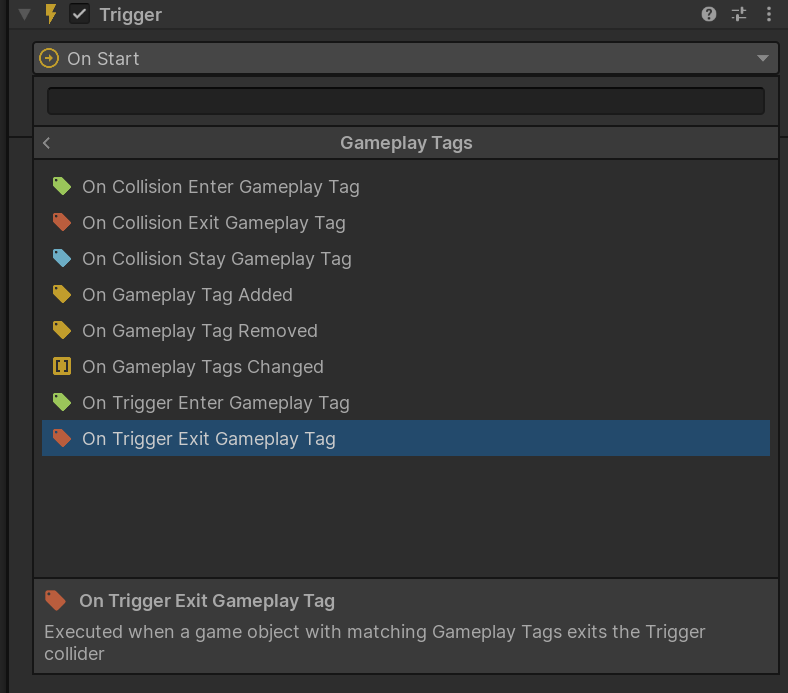
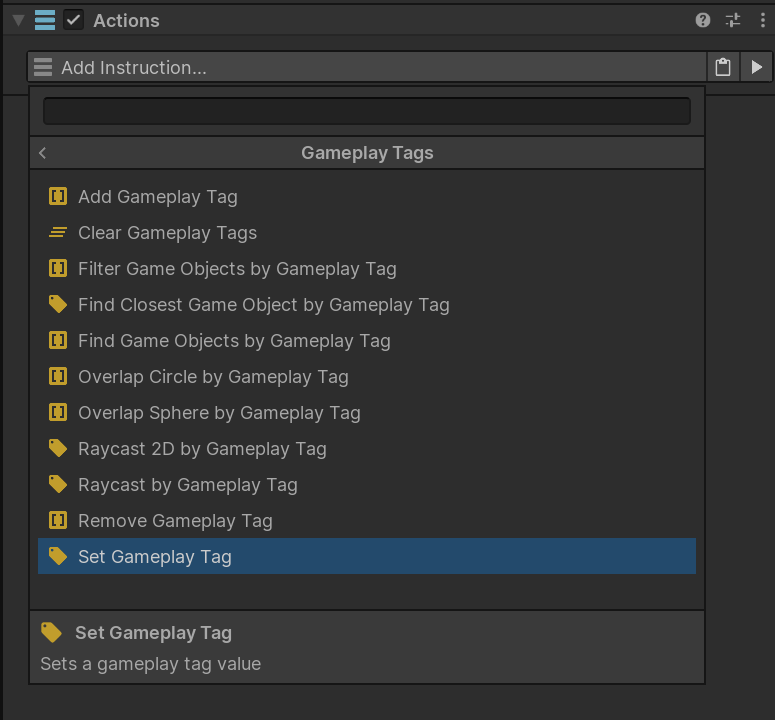
Gameplay Tags Actions let Game Creator logic set tags, update containers, search for tagged objects, filter lists, and run physics queries that only accept tagged results.
Use them when you want designers to build tag-driven logic without writing code.
#Match Options
Several Actions use GameplayTagEventMatch.
| Match | Meaning |
|---|---|
Any |
Match any object that has a GameplayTagComponent with tags. |
Exact |
Match only the selected tag. |
Include Children |
Match the selected tag or any child tag. |
Example:
Tag: Interaction.Usable
Match: Include Children
Matches: Interaction.Usable.Door, Interaction.Usable.Chest
#Set Gameplay Tag
Sets a single Gameplay Tag value.
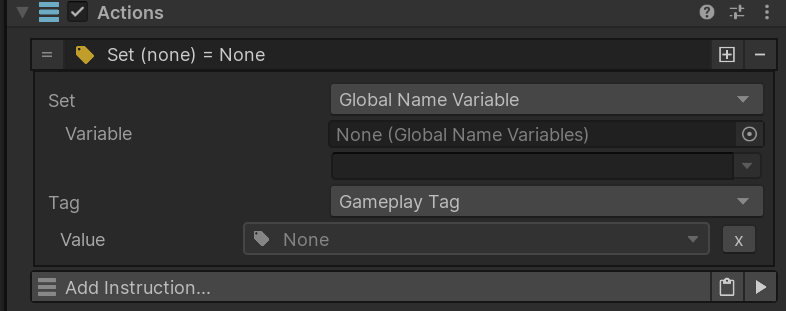
| Parameter | Description |
|---|---|
| Set | Destination that receives the tag. |
| Tag | Tag value to assign. |
#Use It For
- Setting a current damage type.
- Updating a single state variable.
- Assigning the primary tag on a compatible target.
#Example
Set a Game Creator variable named CurrentDamageType to:
Damage.Type.Fire
Then use that variable in later Actions or Conditions.
#Add Gameplay Tag
Adds a tag to a tag container.
| Parameter | Description |
|---|---|
| Set | Destination tag container. |
| Tag | Tag to add. |
#Use It For
- Applying states such as
Character.State.Stunned. - Marking an object as interactable.
- Adding temporary combat effects.
#Example
When a fire trap hits an enemy:
- Target the enemy's
GameplayTagComponent. - Add
Character.State.Burning. - Use Conditions elsewhere to react to burning enemies.
#Remove Gameplay Tag
Removes a tag from a tag container.
| Parameter | Description |
|---|---|
| Set | Destination tag container. |
| Tag | Tag to remove. |
#Example
When a stun timer ends, remove:
Character.State.Stunned
from the target's GameplayTagComponent.
Tip
Pair temporary state tags with clear removal logic. This keeps runtime state easy to reason about.
#Clear Gameplay Tags
Removes every tag from a container.
| Parameter | Description |
|---|---|
| Set | Tag container to clear. |
#Use It For
- Resetting temporary query containers.
- Clearing runtime-only tags during setup.
Warning
Avoid clearing identity tags likeFaction.PlayerorFaction.Enemyunless that is intentional.
#Find Game Objects by Gameplay Tag
Fills a Game Creator List Variable with active GameObjects that match a tag query.
| Parameter | Description |
|---|---|
| Tag | Tag to search for. |
| Match | Any, Exact, or Include Children. |
| List Variable | List Variable that receives matching GameObjects. |
#Example
Find all active enemies:
Faction.Enemy
Store them in a List Variable, then loop through the list to apply an effect.
Performance Note
This searches active tagged objects in the scene. Use it for occasional queries, not constant per-frame scanning in large scenes.
#Find Closest Game Object by Gameplay Tag
Finds the closest active matching GameObject from an origin point.
| Parameter | Description |
|---|---|
| Tag | Tag to search for. |
| Match | Any, Exact, or Include Children. |
| Origin | Position used to measure distance. |
| Max Distance | Maximum search distance. 0 means no limit. |
| Store In | GameObject property that receives the result. |
#Example
Find the nearest usable object around the player:
Interaction.Usable
Use Include Children to match Interaction.Usable.Door, Interaction.Usable.Chest, and similar tags.
#Filter Game Objects by Gameplay Tag
Filters a Game Creator List Variable and keeps only GameObjects with matching tags.
| Parameter | Description |
|---|---|
| List Variable | List to filter. |
| Tag | Tag query. |
| Match | Any, Exact, or Include Children. |
#Example
After collecting nearby objects, keep only enemies:
Faction.Enemy
This is useful after overlap, trigger, or custom collection logic.
#Raycast by Gameplay Tag
Performs a 3D raycast and stores the first hit GameObject that matches the tag query.
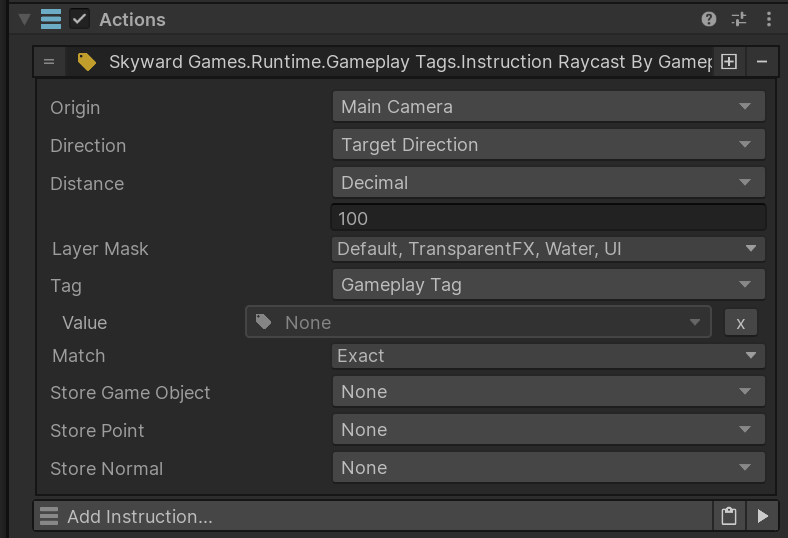
| Parameter | Description |
|---|---|
| Origin | Ray start position. |
| Direction | Ray direction. |
| Distance | Ray length. |
| Layer Mask | Physics layers included in the raycast. |
| Tag | Required tag query. |
| Match | Any, Exact, or Include Children. |
| Store GameObject | Stores the matched GameObject. |
| Store Point | Stores the hit point. |
| Store Normal | Stores the hit normal. |
#Example
Raycast from the camera and accept only usable objects:
Interaction.Usable
Use Unity layers for broad physics filtering and Gameplay Tags for gameplay meaning.
#Raycast 2D by Gameplay Tag
Performs a 2D raycast and stores the first hit GameObject that matches the tag query.
| Parameter | Description |
|---|---|
| Origin | Ray start position. |
| Direction | Ray direction. |
| Distance | Ray length. |
| Layer Mask | Physics 2D layers included in the raycast. |
| Tag | Required tag query. |
| Match | Any, Exact, or Include Children. |
| Store GameObject | Stores the matched GameObject. |
| Store Point | Stores the hit point. |
| Store Normal | Stores the hit normal. |
#Example
In a 2D game, raycast toward the cursor and store the first:
Interaction.Usable
object.
#Overlap Sphere by Gameplay Tag
Runs a 3D sphere overlap and stores matching GameObjects in a List Variable.
| Parameter | Description |
|---|---|
| Center | Sphere center position. |
| Radius | Sphere radius. |
| Layer Mask | Physics layers included in the overlap. |
| Tag | Required tag query. |
| Match | Any, Exact, or Include Children. |
| Store In | List Variable that receives matching GameObjects. |
#Example
Find enemies inside an explosion radius:
Faction.Enemy
Then loop through the results and apply damage.
#Overlap Circle by Gameplay Tag
Runs a 2D circle overlap and stores matching GameObjects in a List Variable.
| Parameter | Description |
|---|---|
| Center | Circle center position. |
| Radius | Circle radius. |
| Layer Mask | Physics 2D layers included in the overlap. |
| Tag | Required tag query. |
| Match | Any, Exact, or Include Children. |
| Store In | List Variable that receives matching GameObjects. |
#Example
Find nearby pickups:
Item.Pickup
#Related Game Creator Events
The plugin also includes tag-aware Events.
| Event | Use |
|---|---|
| On Gameplay Tags Changed | Run when a target component's tags change. |
| On Gameplay Tag Added | Run when a matching tag is added. |
| On Gameplay Tag Removed | Run when a matching tag is removed. |
| On Trigger Enter Gameplay Tag | Run when a tagged object enters a trigger. |
| On Trigger Exit Gameplay Tag | Run when a tagged object exits a trigger. |
| On Collision Enter Gameplay Tag | Run when a tagged object starts colliding. |
| On Collision Stay Gameplay Tag | Run while a tagged object remains colliding. |
| On Collision Exit Gameplay Tag | Run when a tagged object stops colliding. |