#Tag Containers
A tag container is a collection of Gameplay Tags. Containers let one object, variable, or property hold multiple labels at the same time.
Example:
Faction.Enemy
Character.State.Burning
Damage.Resistance.Fire
Interaction.Usable
This makes gameplay logic composable. An object can be an enemy, burning, fire-resistant, and usable without requiring four unrelated booleans.
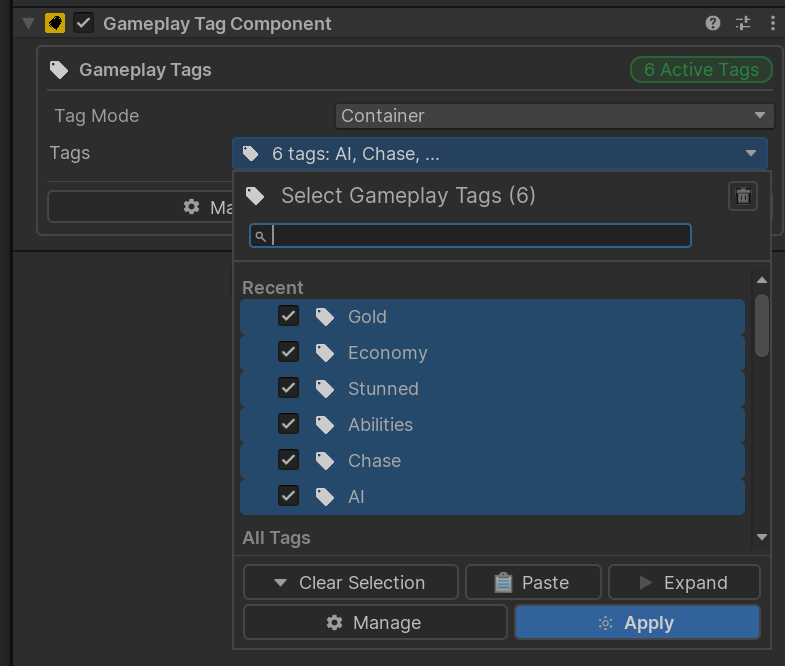
#GameplayTagComponent
Add Game Creator > Gameplay Tags > Gameplay Tag Component to any GameObject that should participate in tag-based logic.
Common examples:
- Player and enemy prefabs.
- Interactable objects.
- Pickups and loot.
- Doors, chests, switches, traps.
- Quest objects.
- Area triggers.
The component exposes a runtime tag container that can be read or changed by Game Creator and C#.
#Container Mode and Single Tag Mode
| Mode | Best For | Example |
|---|---|---|
| Container | Objects with several simultaneous tags. | Enemy + Burning + Fire Resistant |
| Single Tag | Objects that should hold one primary tag. | One current quest state |
Container mode is the most flexible and is the best default for most gameplay objects.
Single Tag mode is useful for exclusive categories:
Quest.Main.Available
Quest.Main.Active
Quest.Main.Completed
When a new tag is set in Single Tag mode, it replaces the previous tag.
#Add, Remove, Clear, and Set
Tags can be changed at runtime through Game Creator Actions:
| Action | Use |
|---|---|
| Add Gameplay Tag | Apply a state, category, or capability. |
| Remove Gameplay Tag | Remove a temporary state or category. |
| Clear Gameplay Tags | Empty a container. |
| Set Gameplay Tag | Assign a single tag value. |
Typical status effect flow:
- Add
Character.State.Burningwhen the fire effect starts. - Conditions check that tag to change behavior.
- Remove
Character.State.Burningwhen the effect ends.
#Runtime Matching
Containers support direct tag checks and container queries:
| Query | Meaning |
|---|---|
| Has Tag | Does this container include this tag? |
| Contains Any | Does this container include at least one query tag? |
| Contains All | Does this container include every query tag? |
| Equals | Does this container exactly match another container? |
Matching can be exact or include children.
Owned: Damage.Type.Fire
Query: Damage.Type
Mode: Include Children
Result: true
#Runtime Behavior
At runtime:
- Adding an empty
Nonetag does nothing. - Duplicate tags are ignored.
- Containers are normalized and sorted.
- Removing a tag that is not present does nothing.
- Clearing an empty container does nothing.
- Tags are resolved through redirects when using the service and component APIs.
- Undefined tags can warn in the Editor or development builds.
Tip
Use tags for meaning, not values.Damage.Type.Fireis a good tag.Damage.Amount.25should be a number variable instead.
#Tag Change Events
GameplayTagComponent exposes runtime events:
EventTagsChangedEventTagAddedEventTagRemoved
Game Creator also includes tag-based Events:
| Event | Use |
|---|---|
| On Gameplay Tags Changed | React whenever a component's tag container changes. |
| On Gameplay Tag Added | React when a matching tag is added. |
| On Gameplay Tag Removed | React when a matching tag is removed. |
| On Trigger Enter Gameplay Tag | Run when a tagged object enters a trigger. |
| On Trigger Exit Gameplay Tag | Run when a tagged object exits a trigger. |
| On Collision Enter Gameplay Tag | Run when a tagged object starts colliding. |
| On Collision Stay Gameplay Tag | Run while a tagged object remains colliding. |
| On Collision Exit Gameplay Tag | Run when a tagged object stops colliding. |
#Saving Runtime Tags
The plugin includes a Game Creator memory type:
Game Object/Gameplay Tags
Use it when runtime tags on a GameplayTagComponent should be remembered by Game Creator save systems.
#C# Example
using SkywardGames.Runtime.GameplayTags;
using UnityEngine;

public class BurningState : MonoBehaviour
{
    [SerializeField] private GameplayTagComponent tags;

    private static readonly GameplayTag Burning =
        GameplayTag.FromPath("Character.State.Burning");

    public void Apply()
    {
        tags.AddTag(Burning);
    }

    public void Remove()
    {
        tags.RemoveTag(Burning);
    }
}
#Practical Use Cases
#Character States
Character.State.Stunned
Character.State.Burning
Character.State.Invulnerable
Use these to enable or block movement, attacks, abilities, prompts, and AI decisions.
#Combat Filtering
Faction.Enemy
Faction.Ally
Damage.Type.Fire
Damage.Resistance.Fire
Use these to filter targets and drive damage responses.
#Interaction Rules
Interaction.Usable
Interaction.Locked
Interaction.Usable.Door
Use these for raycasts, overlap checks, prompts, and interaction branches.