#Gameplay Tag Reactions & Lifecycle Events
Gameplay Tag Reactions and Tagged Game Object Lifecycle Events allow your Game Creator 2 logic to react automatically when GameObjects with a GameplayTagComponent are created, enabled, disabled, destroyed, or when their active tags change.
Instead of writing custom polling loops, singleton manager scripts, or scene-wide FindObjectsByType queries, you configure reactive rules or run batch visual scripting operations directly inside Game Creator.
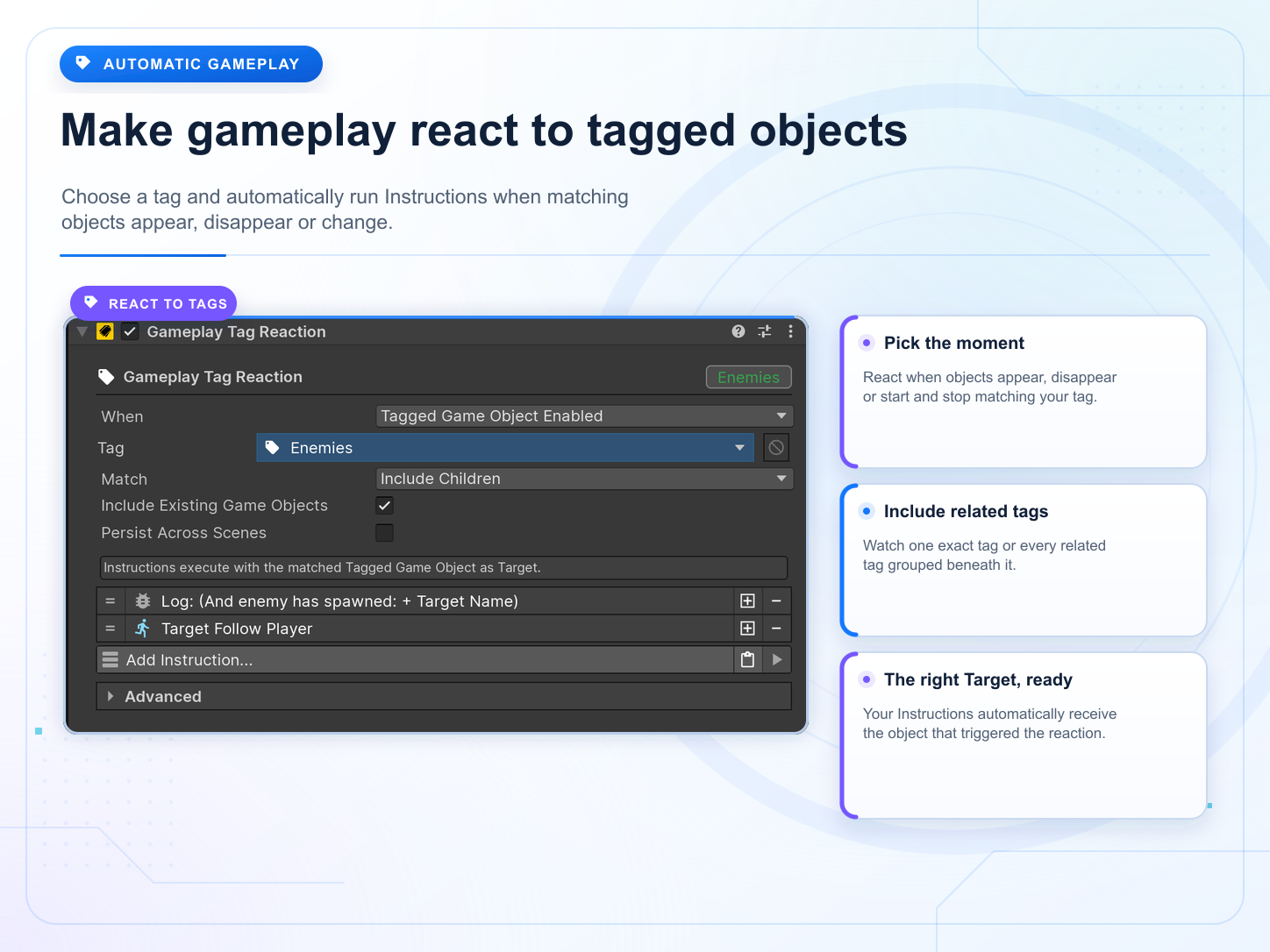
#Two Integration Workflows
You can integrate tag reactions through two flexible patterns depending on your architecture:
#1. Game Creator Trigger Events
Native Game Creator 2 Event types usable on any standard Trigger component:
- On Tagged Game Object Created: Fires once per
GameplayTagComponentlifetime (inAwake). - On Tagged Game Object Enabled: Fires whenever a
GameplayTagComponententers the active registry (inOnEnable, including instantiation and object pooling). - On Tagged Game Object Disabled: Fires when an active
GameplayTagComponentleaves the active registry (inOnDisable). - On Tagged Game Object Destroying: Fires in
OnDestroywhile the matched Target GameObject is still valid. - On Gameplay Tag Starts Matching: Fires when an active Tagged Game Object gains tags causing it to match the query.
- On Gameplay Tag Stops Matching: Fires when an active Tagged Game Object loses tags causing it to no longer match the query.
Trigger (e.g. on EnemyUpgradeManager)
  └ Event: On Tagged Game Object Enabled
      ├ Tag: Unit.Enemy.Archer
      ├ Match: Include Children
      └ Include Existing Game Objects: [ ]
  └ Instructions:
      ├ Apply Archer Upgrades (Target)
      └ Log Spawned (Target)
- Target: Resolves automatically to the matched instantiated or unpooled Tagged Game Object (
Target). - Self: Resolves to the GameObject holding the
Trigger(Self).
#2. Standalone Component: GameplayTagReaction
A specialized Visual Scripting component inheriting directly from Game Creator's BaseActions. It provides built-in FIFO serialized queueing for high-throughput spawning waves, live play-mode telemetry, and optional cross-scene persistence.
To create one in your scene:
GameObject > Game Creator > Gameplay Tags > Gameplay Tag Reaction
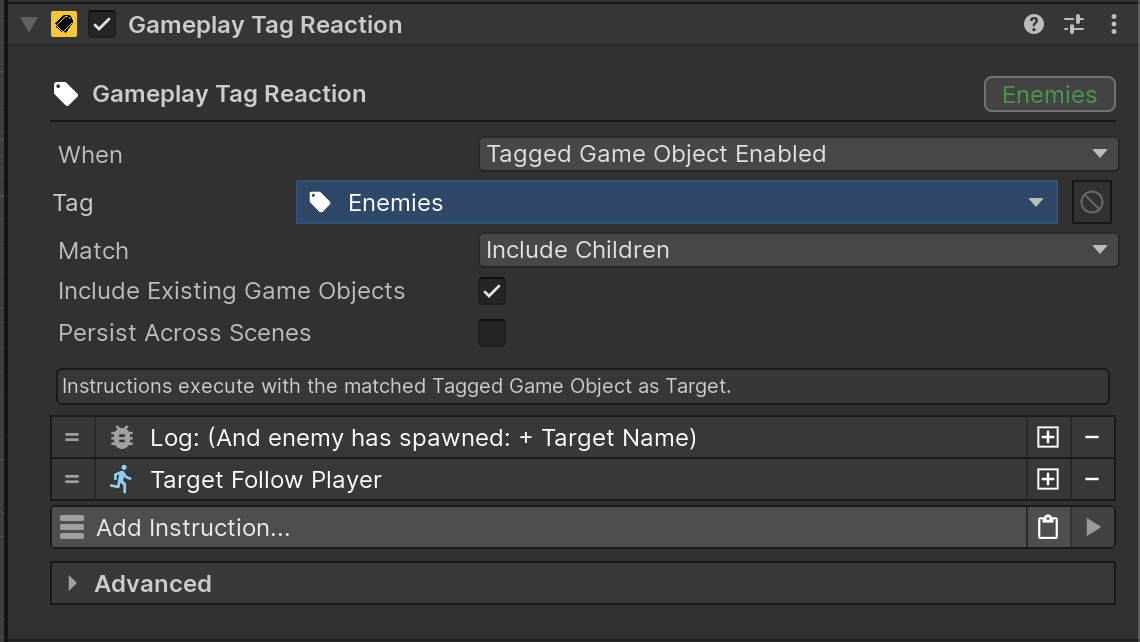
#Inspector Configuration
| Property | Description |
|---|---|
| When | Lifecycle event that triggers this reaction (Tagged Game Object Enabled, Created, Disabled, Destroying, Starts Matching, Stops Matching). |
| Tag | Target Gameplay Tag filter to match. |
| Match | Match mode: Exact (strict match) or Include Children (matches root and any sub-branches like Unit.Enemy.Boss). |
| Include Existing Game Objects | If checked, automatically evaluates and executes against matching GameObjects already active in the scene when the component starts. |
| Persist Across Scenes | Keeps this Reaction active across scene transitions (DontDestroyOnLoad) with automatic deterministic duplicate protection. |
| Execution | How multiple matching objects are processed: Simultaneous (parallel), Queue (FIFO serialized), or Ignore While Busy. |
| Timing / Delay | When instructions start: Immediate, Next Frame, or Custom Seconds. |
#Execution Modes and Startup Timing
Under the ▸ Advanced foldout in the Inspector:
#Execution Modes
Simultaneous(Default): Runs instructions immediately in parallel for every matched object. Perfect when multiple enemies spawn at once and each needs to play its spawn animation or apply stats independently.Queue: Processes matching objects one-by-one in FIFO order, waiting for each object's instructions to finish before starting the next. Ideal for turn-based queues, cinematic introductions, or boss announcements.Ignore While Busy: If instructions are currently executing, any new matching object is dropped/ignored (ideal for cooldown-based reactions or single-slot triggers).
#Startup Timing and Delay
Immediate(Default): Runs instructions in the exact same frame when triggered.Next Frame: Waits 1 frame before executing instructions. (Recommended for newly instantiatedCharacterprefabs so that child animators, ragdolls, and colliders complete their startup lifecycle first!)Custom Seconds: Waits for a specified duration in seconds before running instructions.
#Cross-Scene Persistence (Persist Across Scenes)
When Persist Across Scenes is enabled:
- The GameObject automatically survives Unity scene transitions using
DontDestroyOnLoad. - Deterministic Duplicate Resolution (
Keep Existing): If a scene reloads containing a duplicate persistent Reaction that was already loaded in a previous scene, the existing persistent instance is kept and the incoming duplicate is destroyed deterministically based on its stable persistent ID. - If the GameObject is parented in the hierarchy, it is automatically detached to the root level at runtime.
#Session-Wide Rule Example
When:                   Tagged Game Object Enabled
Tag:                    Unit.Enemy
Persist Across Scenes:  On
Instructions:
    Apply Global Difficulty Scaling (Target)
This applies game-wide enemy scaling across all scenes during the play session without needing a separate singleton manager script.
#Imperative Execution: "For Each Tagged Game Object"
While GameplayTagReaction is reactive (waiting for spawns or tag changes), you can also execute instructions imperatively across all matching objects on demand (e.g. casting an AoE spell, triggering global day/night lighting changes, or dealing damage to all enemies).
Instruction: For Each Tagged Game Object
    Tag:                 Unit.Enemy
    Match:               Include Children
    Include Inactive:    [x]  (Enables matching disabled/inactive GameObjects)
    Mode:                Inline Instructions (or Actions Component)
    Instructions:
        Set Active (Target) to True
    Wait Until Complete: [x]
- Inline Instructions (Default): Write your instructions directly inside the
For Eachblock in the inspector — no extra GameObjects or Actions components required! - Actions Component: Optionally reference an external
Actionscomponent for shared, reusable logic across scripts. - Include Inactive Option: When checked, iterates over disabled/pooled GameObjects in the scene hierarchy (ideal for respawning enemies or bulk-activating pooled objects). When unchecked (default), processes only active objects for zero-allocation performance.
- Target Resolution: For each iteration, instructions run with
Targetbound to that specific matched instance (Selfremains the caller). - Execution Options: Supports sequential (
Wait Until Complete = true) or concurrent / parallel execution (Wait Until Complete = false). - Zero Allocation: Utilizes internal non-allocating cached buffers for maximum runtime efficiency.
#Visual Scripting Suite
The package provides a full suite of Game Creator 2 Visual Scripting elements organized into dedicated sub-categories:
#Instructions (Gameplay Tags/Reactions/)
| Instruction | Description |
|---|---|
| For Each Tagged Game Object | Imperatively queries matching objects and runs Inline Instructions or an Actions component with Target set to each instance. |
| Execute Reaction Manually | Manually triggers a GameplayTagReaction on a specific target or across all matching objects in the scene. |
| Set Reaction Tag | Changes the target tag filter at runtime. |
| Set Reaction When | Changes the triggering lifecycle condition at runtime. |
| Set Reaction Match | Changes the match mode (Include Children / Exact). |
| Set Reaction Delay | Changes the startup timing mode (Immediate, Next Frame, Custom Seconds) and duration at runtime. |
| Cancel Reaction | Cancels running instructions and clears the pending execution queue. |
| Evaluate Existing Objects in Reaction | Re-evaluates active matching Tagged Game Objects. |
#Conditions (Gameplay Tags/Reactions/)
| Condition | Description |
|---|---|
| Is Reaction Running | Returns true if the reaction is executing instructions or processing its queue. |
| Reaction Has Queued Objects | Returns true if there are objects waiting in the FIFO queue. |
| Reaction Matches Object | Returns true if a Target GameObject matches the filter criteria of the Reaction. |
#Properties (Gameplay Tags/)
| Property | Type | Description |
|---|---|---|
| Gameplay Tag Reaction Tag | PropertyTypeGetGameplayTag |
Returns the configured tag filter. |
| Gameplay Tag Reaction Queued Count | PropertyTypeGetDecimal |
Returns the number of queued objects in the reaction. |
| Gameplay Tag Reaction Is Running | PropertyTypeGetBool |
Returns true if the reaction is running or busy. |
#Runtime C# API
You can also interact with and mutate Reactions directly from C#:
using SkywardGames.Runtime.GameplayTags;

// Modify configuration dynamically at runtime:
reaction.SetGameplayTag(GameplayTag.FromPath("Unit.Enemy.Elite"));
reaction.SetMatch(GameplayTagMatchMode.Exact);
reaction.SetWhen(GameplayTagReactionType.TaggedGameObjectStartsMatching);
reaction.SetPersistAcrossScenes(true);

// Cancel running executions and clear queue:
reaction.Cancel();

// Reset runtime modifications back to authored defaults:
reaction.ResetRuntimeStateToDefaults();
#Distinction: Lifecycle vs Tag Added
| Event / Reaction Type | Trigger Reason |
|---|---|
| On Gameplay Tag Added | Reacts when a tag is added to an existing active source during gameplay (tag mutation). |
| On Tagged Game Object Enabled | Reacts when a Tagged Game Object becomes active in the world while already matching the tag filter (e.g. newly spawned/pooled prefab entering the active registry). |
#Object Pooling Lifecycle
Both systems hook cleanly into the active registry lifecycle of GameplayTagComponent:
- Instantiate / Enable: Component registers $\rightarrow$
On Tagged Game Object Enabledfires. - Disable (return to pool): Component unregisters $\rightarrow$
On Tagged Game Object Disabledfires. - Re-Enable (pull from pool): Component registers again $\rightarrow$
On Tagged Game Object Enabledfires again.
No per-frame polling or FindObjectsByType scans are performed!
#Interactive Example Scene
Open 3_GameplayTagReactions.unity (included in the Gameplay Tags Examples package via Game Creator Hub) to explore live demonstrations of:
- Reactive spawning with automatic upgrade scaling.
- FIFO queued reaction demonstrations.
- Inline
For Each Tagged Game Objectmass-activation. - Object pooling lifecycle transitions with in-scene tutorial cards.