
#Runtime API
Use the static AssetReferences facade for runtime lookup, streaming control, and event observation.
#Common Tasks
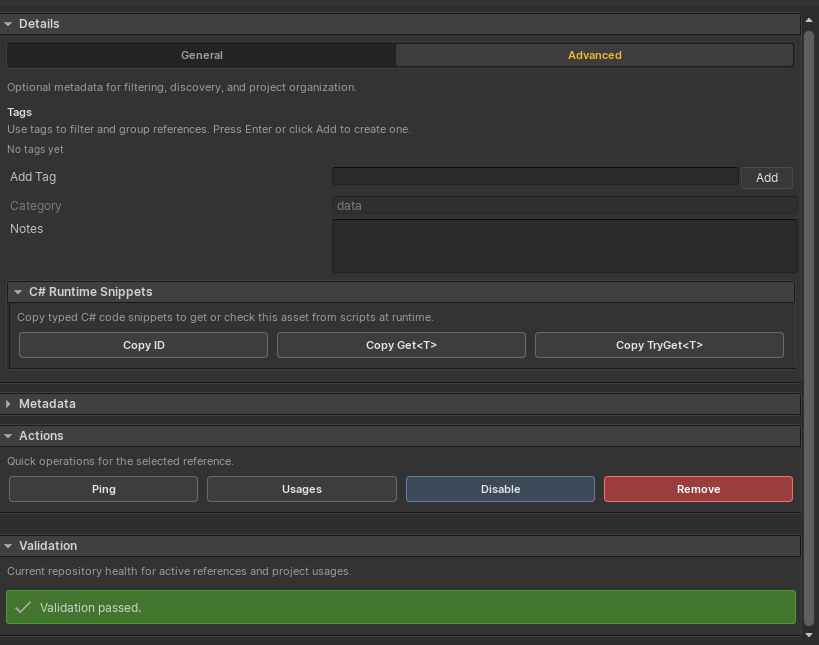
The selected reference's Advanced details panel can copy the ID, a typed Get<T> snippet, or a safe TryGet<T> snippet.
ScreenshotOpen full size
using SkywardGames.AssetReferences;
using UnityEngine;

AudioClip clip = AssetReferences.Get<AudioClip>("audio-hit-impact");

if (AssetReferences.TryGet("prefab-boss-enemy", out GameObject prefab))
{
    Object.Instantiate(prefab);
}#Methods
| Method | Purpose |
|---|---|
Exists(string id) | Returns true when an enabled reference exists. |
IsLoaded(string id) | Returns true when a Direct asset is cached or a Streamed asset is loaded. |
Get(string id) | Resolves a Unity object or returns null. |
Get<T>(string id) | Resolves a typed Unity object or returns null. |
TryGet(string id, out Object asset) | Safe object resolve with a success flag. |
TryGet<T>(string id, out T asset) | Safe typed resolve with a success flag. |
GetAsync<T>(string id) | Async typed resolve, useful for Streamed entries. |
TryGetEntry(string id, out AssetReferenceEntry entry) | Gets repository metadata. |
GetAll() | Returns registered enabled entries. |
Preload(string id) | Starts loading a Streamed asset. |
Release(string id) | Releases a loaded Streamed asset. |
ReleaseAll() | Releases all loaded Streamed handles. |
RebuildCache() | Rebuilds runtime lookup state. |
#Direct And Streamed Resolution
Direct entries resolve synchronously from serialized references. Streamed entries load through Addressables. Synchronous getters keep existing GC2 integrations simple, while GetAsync<T> is available when custom code wants async flow.
Disabled entries are skipped during cache initialization.
#Runtime Events
AssetReferences.Resolved += args =>
{
    Debug.Log($"Resolved {args.Id}: {args.Asset}");
};

AssetReferences.Missing += args =>
{
    Debug.LogWarning($"Missing Asset Reference: {args.Id}");
};
Events include:
ResolvedStreamedLoadedReleasedMissing
Each event receives AssetReferenceEventArgs with Id, Entry, Asset, and LoadMode.
#Game Creator Variable Helpers
using GameCreator.Runtime.Variables;
using SkywardGames.AssetReferences.GameCreator;
using UnityEngine;

public sealed class ReferenceVariableExample : MonoBehaviour
{
    [SerializeField] private LocalNameVariables variables;

    private void Start()
    {
        AssetReferenceVariables.Set(this.variables, "current-music", "audio-menu-theme");

        if (AssetReferenceVariables.TryGet(this.variables, "current-music", out AudioClip clip))
        {
            Debug.Log($"Resolved {clip.name}");
        }
    }
}